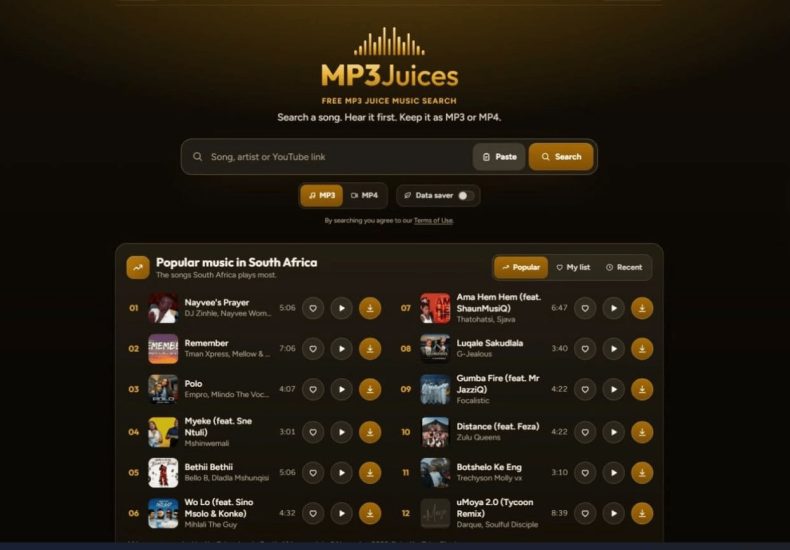
Scored on Payoff: Ranking mp3juices.art Features for Casual Listeners
Scored on Payoff: Ranking mp3juices.art Features for Casual Listeners
Every feature on a music site looks useful in a screenshot. The real question is what it saves you when you just want a song on your phone before a commute. To answer that, I scored mp3juices.art on two axes: time saved and friction removed. A single number hides nuance, and it definitely hides the difference between a feature that sounds clever and one you will actually use twice. I scored anyway, because transparent criteria beat vague praise.
The scoring logic is simple. Each feature gets a time-saved score out of 10 and a friction-removed score out of 10, then I average them into a payoff score. Time saved means how many steps it removes from finding, previewing and saving a track. Friction removed means how much it eliminates in accounts, installs, paywalls, format confusion and guesswork. A feature that is fun but rarely needed lands in the middle. A feature that quietly kills a step you used to hate lands near the top.
How the Two Axes Change the Ranking
Time saved is the easier axis to judge. If a feature turns three clicks into one, it scores well. If it only rearranges buttons you would have clicked anyway, it scores poorly. Friction removed is subtler. It covers things like not needing an account, not installing software, and not guessing whether a file will play on your device. Together the two axes reward features that make the casual listener’s path shorter and less annoying, not features that impress on a demo.
I weighted them equally on purpose. A casual listener rarely cares whether a tool is technically elegant; they care whether the song is playing while they are still interested. That means a plain search box that works instantly can outscore a flashy chart page. It also means the site’s quiet conveniences, like format choice, matter more than they look. The ranking below follows the average, and I note where the average hides a real trade-off.
The Top Tier: Search, Preview and Download
Free Music Search — 9.4
Search is the entry point and the biggest time saver on the site. You type a song or artist, and results come back without an account or an install. That combination is worth more than it sounds, because most alternatives either ask you to register or bury the search behind an app download. Time saved: 10. Friction removed: 8.8. The small deduction is for the reality that search quality depends on what the site has indexed, so an obscure track may need a second attempt.
Listen Before You Download — 9.0
Previewing a track before saving it is the feature that prevents the most wasted downloads. A wrong version, a bad rip or a live recording you did not want is a file you have to delete later. Previewing removes that whole cycle. Time saved: 8.5. Friction removed: 9.5. It scores slightly below search only because you still have to make the same number of decisions, just with better information.
MP3 Download — 8.8
This is the core promise, and it delivers the obvious payoff: a song file you can keep. The format is broadly compatible with phones, laptops and car stereos, which is why it removes friction for casual users who do not want to think about codecs. Time saved: 9. Friction removed: 8.6. It loses a little because file quality and availability vary by track, so the experience is not perfectly uniform across every search.
The Middle Tier: Format Choice and Browsing
MP4 Download — 7.9
MP4 matters when the thing you want is a video, not just audio. For a casual listener, that is a narrower use case, so the time saved is real but situational. Friction removed is high for anyone who wants a music video offline, because the alternative is a separate video downloader with its own learning curve. Time saved: 7.5. Friction removed: 8.3. A solid mid-tier feature that earns its place without being the reason most people visit.
Browse by Genre and Artist — 7.4
Browsing is where the site shifts from a search box to a discovery tool. If you know the artist but not the song, artist pages shorten the hunt. Genre browsing is better for mood listening than for a specific track. Time saved: 7. Friction removed: 7.8. It ranks here because casual listeners usually arrive with a song in mind, so browsing is a bonus path rather than the main road.
Charts — 7.1
Charts answer a different question: what is popular right now. That is genuinely useful when you have no specific song in mind and want a starting point. Time saved: 6.5. Friction removed: 7.7. The score reflects that charts are a discovery aid, not a shortcut to a known track, so the payoff depends entirely on why you opened the site.
The Supporting Tier: Personal List and Data Saver
The personal list feature is the quiet organizer of the site. It lets you keep track of tracks you intend to come back to, which saves the repeated search that otherwise eats time on every visit. Time saved: 7.2. Friction removed: 7.0. It scores in the supporting tier because it only pays off once you use the site regularly; a one-off visitor gets little from it.
Data saver mode is the most situational feature in the set, and that is exactly why it deserves a score rather than a mention. On a limited mobile plan, a lighter page and lighter previews can be the difference between browsing comfortably and watching your allowance drain. Time saved: 5.5. Friction removed: 8.0. The average lands at 6.75, but the nuance matters: for a user on metered data, this feature is worth far more than its rank suggests.
Both features share a pattern. They are not the reason someone visits mp3juices.art for the first time, but they are part of why a second visit is easier than the first. That is the definition of a supporting feature: low drama, steady payoff.
Where the Scores Hide Real Trade-offs
Averages flatten things, so here is what the numbers do not say. The top three features all depend on the same underlying assumption: that the track you want is available. When it is, the path from search to saved file is short. When it is not, no amount of interface polish helps, and the honest advice is to try a different spelling or a different version of the title before concluding the song is missing.
Format choice is another place where the average hides a decision. MP3 is the safe default for phones and cars. MP4 is the right call only when you specifically want video. Choosing the wrong one costs you a re-download, which is exactly the kind of friction the scores are meant to measure. The site makes the choice visible, and that visibility is worth more than a single point in the ranking.
Finally, the no-account, no-install design is not a feature with its own row, but it lifts every score above. It is the reason search saves time and the reason previewing is low-friction. If you want to see how that plays out in practice, the mp3juices.art homepage is the fastest way to test the whole chain yourself.
The Scorecard in Summary
Read as a table in words, the ranking looks like this. Search leads at 9.4, previewing follows at 9.0, and MP3 download sits at 8.8. MP4 download is the best of the middle tier at 7.9, with genre and artist browsing at 7.4 and charts at 7.1. The personal list scores around 7.1 and data saver around 6.75, with the caveat that data saver is worth much more to a metered user than its rank implies.
The takeaway for a casual listener is straightforward. Use search and preview as your default path, choose MP3 unless you need video, and treat browsing, charts and the personal list as tools for the days you do not know what you want. The scores are a starting point, not a verdict; the best feature is the one that removes the step you personally hate most. On that measure, the site’s real strength is that it removes several at once, without asking you to sign up or install anything.
Leave a Reply